A Public IP on a SIM Card: WebRTC Over 4G (2/4)
Why the static public IP belongs on the catio's own cellular link, what that fixes, what it does not fix, and how a browser on the other side of the planet negotiates a live stream with a board the size of a chewing-gum pack.
Eleven Cats, One Smart Camera · Part 2 of 4 · The pitch
My cats are in Fethiye. My browser might be thousands of kilometres away. In between: a mobile network, a small embedded computer, and a large collection of networking assumptions waiting to become false.
If you are arriving mid-season: Part 1 introduced the squad (eleven cats in a catio), the kit (an Orange Pi Zero 3W with a Sony sensor and a hardware H.265 encoder) and the house rule that nothing counts until it has been measured. This part is about the pitch: the network the game is played on.
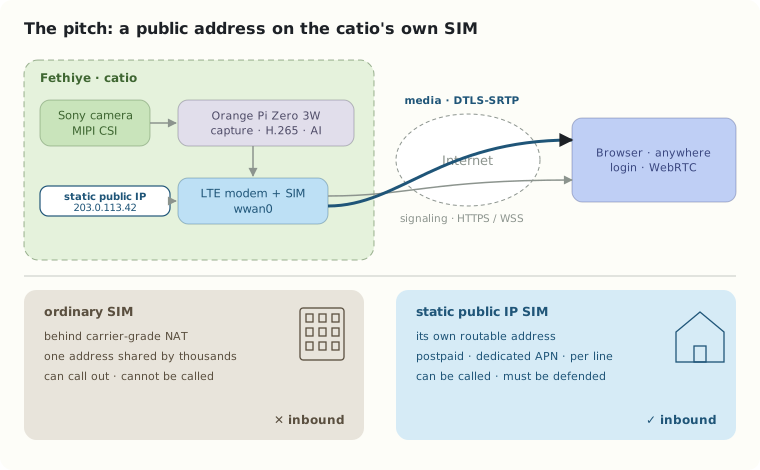
The architectural choice is specific, and I will say it once so I do not have to keep saying it: the cellular modem at the catio carries a carrier-assigned static public IP address. The address lives on the SIM, on the embedded system’s own link, at the enclosure. There is no cloud server, reverse proxy or tunnel endpoint somewhere else pretending to be the camera.
That is a stronger constraint than it first appears. It removes one famous problem and politely introduces several new ones.
Why most SIM cards cannot be servers
Put a SIM in a modem, connect, and you get an IP address. It is almost never yours. Mobile operators ran out of IPv4 addresses years ago, so they put thousands of customers behind carrier-grade NAT: one public address shared by a crowd, with the operator’s equipment keeping track of who started which conversation. [1]
Think of an apartment building with a single street address and a very strict doorman. Residents can go out and come back; replies to conversations they started are let in. But nobody outside can ring a specific flat, because the flats have no address of their own. That is CGNAT, and it is why a camera behind an ordinary SIM cannot accept a connection from the outside world. It can only call out.
A static public IP is the opposite arrangement: your own street address, painted on the pitch for everyone to see. Turkcell, for example, sells it as a per-line add-on on postpaid lines (postpaid data lines, for individual customers) through a dedicated APN (mgbs), for a modest monthly fee, and not on prepaid or twin-SIM lines. [2] The retail SIM in your phone does not have it, and no amount of configuration on the modem will conjure it.
Two words need separating here. Static means the address does not change between sessions. Public means the internet can route to it. Operators also sell static private addresses inside a corporate APN or VPN, which is a fine product for fleets of card terminals and useless for this project. Before any code is written, three facts need confirming with the operator and the modem: the address is genuinely public, inbound traffic is permitted, and the UDP and TCP ports I need are not filtered. An address can be static and still be unreachable.
Where the address actually lands
A detail that costs people a weekend: the public address may not end up where you expect.
An LTE modem on USB (the Quectel EC25 and the SIMCom SIM7600-H variants are the usual candidates, both LTE Category 4, where the non-H SIM7600 parts are only Category 1, and both handled by ModemManager on Linux) can present itself to the host in more than one way. In QMI or MBIM mode, the host gets a raw IP interface, typically wwan0, and the carrier’s address appears directly on it. In RNDIS or ECM mode, the modem behaves like a tiny home router: it keeps the public address for itself, runs its own NAT, and hands the Orange Pi something like 192.168.225.2. The static public IP is then real, paid for, and sitting on the wrong side of a second NAT.
So “the IP is on the modem” needs one more sentence of precision: the catio’s cellular link owns the public address, and the Orange Pi must be the thing answering on it, either because the address is on wwan0 directly or because the modem forwards the right ports. The first is simpler. The second works. The third option, not noticing, does not.
WebRTC is more than a video socket
WebRTC gives a browser a mature real-time media stack: offer and answer negotiation, connectivity checks, encryption, jitter buffers, congestion feedback and playback. What it deliberately does not give you is signaling, the step where the two sides exchange their descriptions and candidate addresses. Where that runs is your decision.
For the first version, a small authenticated HTTPS/WSS service on the Orange Pi handles it: the browser logs in, sends an offer, receives an answer, and both sides exchange ICE candidates. Then ICE, the connectivity-check protocol, tries candidate pairs until one works. [3]
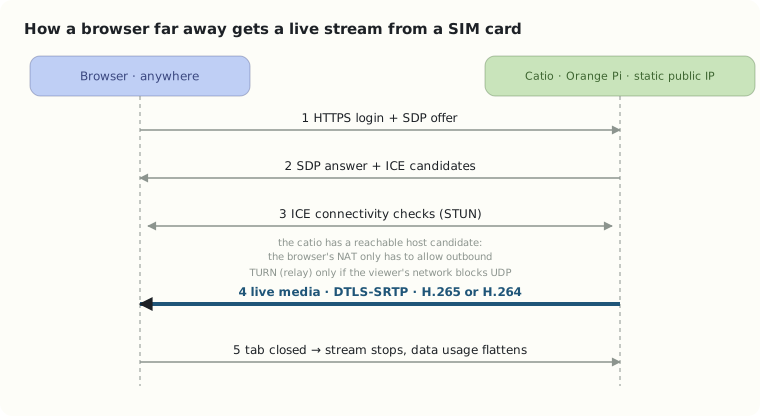
This is where the public address earns its fee. The catio end has a host candidate that the whole internet can reach, so the browser side, however badly it is NATed (hotel Wi-Fi, office firewall, a phone on a different operator), simply connects outbound to it, which every NAT on Earth allows. STUN still helps the browser learn its own public-facing address; TURN, the relay of last resort, is only needed for networks that block UDP outright, and then it typically relays over TCP or TLS on port 443. [4] Even that case has a cheaper answer when one end has a public address: an ICE-TCP candidate on the catio itself can serve a UDP-blocked viewer with no relay at all. TURN is a compatibility component for the viewer’s side of the game, not the place where the catio’s address lives.
Media itself runs over DTLS-SRTP, which WebRTC mandates: the stream is encrypted end to end between the catio and the browser. [5] Hold that thought for the security section, because it is the beginning of the story, not the end.
H.265: excellent compression, complicated browser reality
The Allwinner A733 encodes H.265 in hardware, and HEVC typically squeezes the same visual quality into noticeably fewer bits than H.264, which on a cellular uplink is the whole point. [6]
The catch is the browser. The WebRTC specifications require every browser to support VP8 and H.264; HEVC is optional, and support for it in WebRTC, as opposed to playing an HEVC file, is uneven across browsers and platforms. [7][8] The IETF profile for H.265 in WebRTC is still an Internet-Draft at the time of writing. [9] A browser may happily play an HEVC video file and still refuse to negotiate HEVC as a real-time RTP codec.
So the plan has a fallback, and the fallback is also hardware, because the A733 encodes both:
- Prefer H.265 when the browser advertises it and the negotiation succeeds.
- Fall back to hardware H.264 otherwise.
- Negotiate codecs explicitly and measure both paths end to end: latency, bitrate, CPU load, power.
If the only fallback turned out to require software transcoding on the Orange Pi, that would be a performance problem to solve in testing, not something to hide inside an architecture diagram.
A short exercise in mobile data
A stream averaging 1 Mb/s is about 450 MB per hour before protocol overhead; at 2 Mb/s, about 900 MB per hour. A 10 GB monthly plan at 2 Mb/s is roughly eleven hours of live video. Eleven cats do not all need to move for a live connection to eat a data plan.
Which is why the catio will not stream just because it can. No viewer, no stream. Idle time gets still frames every few minutes and the small events from Part 3. A live session asks for video explicitly and ends it when the tab closes or the viewer stops interacting. And since cellular links wobble, the sender watches packet loss, round-trip time and the receiver’s congestion feedback, and lowers bitrate and resolution when the uplink is struggling rather than insisting on picture quality the network cannot deliver.
A public address is a liability if handled carelessly
Painting your address on the pitch means everyone can see where the goal is, including people you did not invite. Direct reachability simplifies connectivity and enlarges the attack surface in the same stroke.
I will not expose an unauthenticated camera to the internet, and I will not expose a camera “temporarily, just for testing” either, because the internet’s port scanners do not observe office hours. The baseline: a default-deny firewall (nftables) that opens only the signaling port and the UDP media range; TLS and real authentication on the signaling service; rate limiting on the login; SSH reachable only through a WireGuard tunnel, never on the public interface; and deliberate, tested updates. DTLS-SRTP protects the media. It does nothing for a sloppy login page or an admin API that trusts its caller. [5]
A memorable failure mode would be building a beautiful detector for cats and accidentally offering strangers a live view of them. That is neither engineering elegance nor feline hospitality.
What has to be proven in Fethiye
The first network test is not “does it ping”. It is: can an authorized browser on a different operator, from another country, establish a WebRTC session against the catio’s static address, negotiate a codec, stay connected while the uplink varies, and recover after the modem drops and reconnects?
Then the questions nobody puts on a SIM-card listing: does the public address survive a modem reconnect? Is it reachable from abroad, not just from the same operator? Does the operator filter inbound ports on some tariffs and not others? These are deployment facts to be measured, logged and, in Part 4, turned into an acceptance checklist.
Once a browser in one country can watch a shelf in another, Part 3 can ask what the tiny computer actually learns from the frames, without pretending that a neural network recognizes every cat on day one.
References
[1] A10 Networks, What is carrier-grade NAT (CGN/CGNAT)?.
[2] Turkcell, Statik IP service for IoT and corporate lines — per-line subscription, postpaid only, assigned when connecting through the mgbs APN; not available on prepaid or twin-SIM (Eşkart) lines.
[3] IETF, RFC 8445: Interactive Connectivity Establishment (ICE).
[4] IETF, RFC 8656: Traversal Using Relays around NAT (TURN).
[5] IETF, RFC 8827: WebRTC Security Architecture — DTLS-SRTP is mandatory for WebRTC media.
[6] CNX Software, Orange Pi Zero 3W: an Allwinner A733 SBC in Raspberry Pi Zero form factor (15 April 2026) — video engine specifications.
[7] IETF, RFC 7742: WebRTC Video Processing and Codec Requirements — VP8 and H.264 are mandatory for browsers.
[8] MDN, Codecs used by WebRTC.
[9] IETF, H.265 Profile for WebRTC, Internet-Draft draft-ietf-avtcore-hevc-webrtc-10 (20 October 2026).